Simple Way to Repair Split RAR Files
RAR is the native format of WinRAR archives. Like other archives, RAR files can hold a huge amount of information in the compressed form. Whenever you download RAR archive files from the internet, you need to unpack its contents to use it. A file with RAR file extension is a Roshal Archive Compressed file. It is one of the most popular and renowned compression utility to work with and the most common multi-part file types to store multiple file types and split a large file into multiple smaller file types. Usually, the large RAR archive file can be split into four smaller file types of equal parts. However, there underlie certain risks, i.e. even if one part of the file goes missing you will not be able to extract the content of the other 3 RAR archives.
Assume a situation wherein you have downloaded a large video file that splits into multiple parts such as "video.part1.rar", "video.part2.rar", " video.part3.rar", "video.part4.rar" etc. As mentioned earlier, to open and play the video successfully you need all the four parts. Even if one part is missing or corrupt then you will not be able to extract and play video files at any cost.
What causes issues in splitting the RAR Archive File?
- The occurrence of sudden interruption like low network connectivity or improper system termination while splitting an important RAR archive file increases the chances of RAR archive corruption
- Even OS up-gradation, software malfunction, presence of bad sectors, etc. account to conflicts in splitting the RAR file
- Slight damage to any single file of multipart RAR archive while splitting can result in damage to complete RAR archive
- Irregularities whilst working of splitting multi-volume RAR file with the WinRAR application could also be one reason for the RAR corruption
- Many times, while splitting the RAR archive multipart gets corrupt due to RAR header file corruption, this could result in loss of valuable information from the RAR file
- Usage of unreliable tools to extract files and also improper compression methods causes inaccessibility of RAR files
- Even though the RAR archive employs high encryption methods, these files are susceptible to viruses and malicious threats
- The RAR archive split operation also fails because of CRC errors, incomplete download, incorrect file conversions, and many more
Experiencing corruption or damage to a split RAR archive file is a matter of concern for anyone who has stored important data. In such circumstances, you can make use of inbuilt repair utility WinRAR application. However, the inbuilt repair might fail to fix the split RAR archives in the case of severe corruption. At such an instance, you should make use of the WinRAR Repair software to fix the split RAR files.
How to repair split RAR archives?
The WinRAR Repair is the best-suited application to fix the corrupt or damaged RAR archives. This app, repairs split RAR archive file with missing parts in a matter of a few clicks. It is an award-winning tool, that can easily extract corrupted RAR files of the size of 4GB or more. The split RAR repair utility can also be used to deal with all types of WinRAR errors and corruption scenarios; smartly restoring the RAR contents.
Moreover, this software has the advanced repair strategies that are capable to repair password-protected split RAR archive files with ease. It is non-destructive and read-only software, which makes sure that the original corrupt split RAR archive file is not modified. It has an intuitive and easy-to-use interface that offers a hassle-free repair. The WinRAR Repair software is fully compatible with Windows OS 10, 8, 7, Vista, XP, 2003, 2000, etc.
Useful reading: This proficient WinRAR Repair utility can also fix CRC error with ZIP archives easily.
Precautionary Measures:
- Always make use of genuine antivirus software to scan the split RAR archive files prior to download process
- Avoid sudden interruption while downloading split RAR archive files
- Never never use an unreliable application to open/extract the split RAR archive file
Easy steps to Fix Split RAR Archive file
Step 1: Install the software on your system and open its main screen as shown in Figure A.
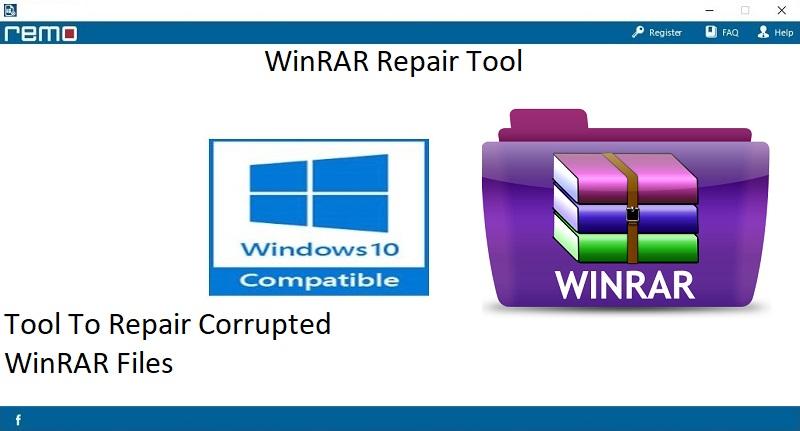
Figure A: Main Screen
Step 2: Browse to select the split RAR archive file and click on the "Repair" button as shown in Figure B.
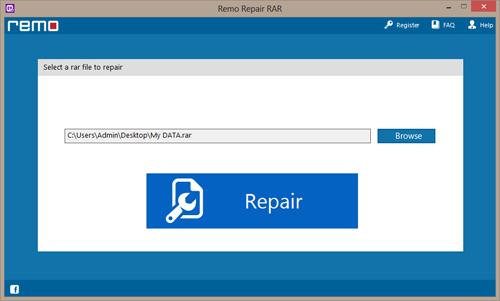
Figure B: Select Split RAR Archive
Step 3: Now, select the location to save repaired RAR archive file and click on the "Save" option as shown in Figure C.
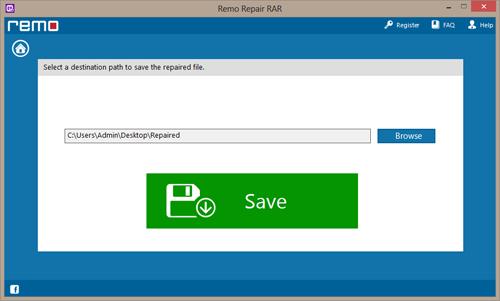
Figure C: Save the Fixed RAR File

